


A good prompt is a starting point. A dependable Power BI development workflow also needs project context, appropriate tools, clear permissions and a way to check the result.
DataDriven.pro now offers Power BI agentic development consultancy, with a toolkit that includes VS Code Agent for Windows, OpenClaw, Hermes Agent and GitHub Copilot.
The opportunity is to move beyond disconnected suggestions towards bounded development tasks that can be inspected and validated. The challenge is to do that without confusing an agent’s ability to make a change with evidence that the change is correct.
What is changing in Power BI development?
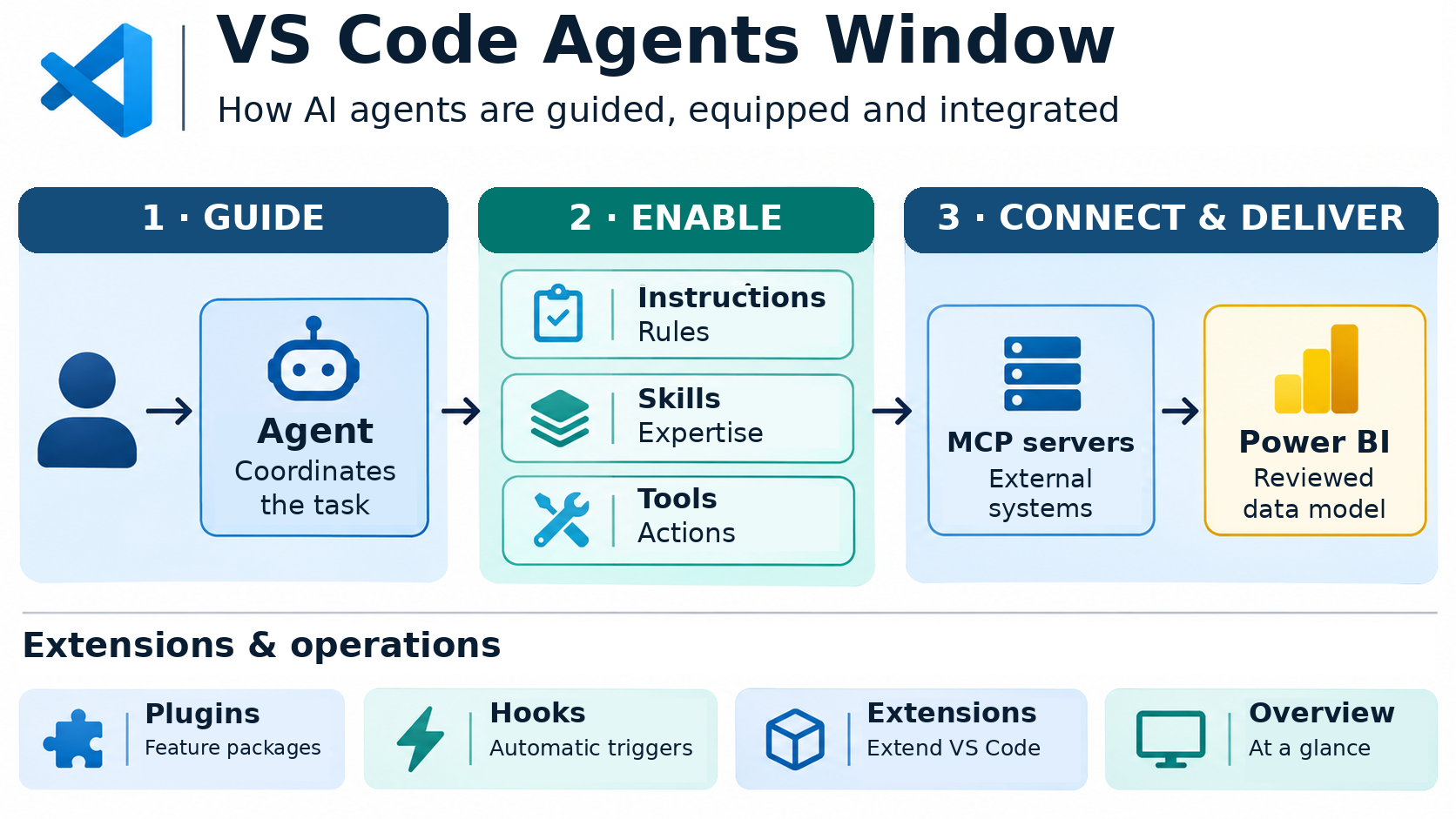
Microsoft describes Power BI Agentic as a set of agent skills and tools for developing semantic models and reports with AI coding agents. Its documentation distinguishes instructions that guide an agent from tools that let it interact with development artefacts and Power BI environments.
That distinction matters. A chat assistant may explain a DAX expression without being able to inspect your project. An appropriately connected authoring workflow may be able to work with relevant model or report definitions—but only within the capabilities and permissions of the actual setup.
Authoring is also different from consumption. Changing a semantic model is not the same job as answering a business question against a governed, existing model. They should not be treated as interchangeable integrations.
The diagram separates guidance from execution. Instructions and skills shape how an agent approaches the task; tools expose the actions it can perform. An MCP connection does not remove authentication, tool limitations or the need to review a Power BI result.

What should an agentic workflow produce?
The useful output is not simply more generated code. It is a change that the team can understand, test and decide whether to accept.
A practical way to evaluate that is to ask:
- Is the requested change specific enough to verify?
- Can the agent access the necessary context without unnecessary data or permissions?
- Are the affected artefacts visible and reviewable?
- Do the checks cover the business meaning as well as technical validity?
- Is there an explicit decision before the change reaches production?
These questions are useful whether the work concerns measures, queries, model structure, documentation or report definitions. They do not imply that every tool supports every task.
A proposed five-step pilot
The following is a practical starting framework for a consultancy discussion, not a fixed package or a promise of unattended delivery.
1. Choose one bounded task
Start with a meaningful but contained problem. Examples to assess include clarifying an existing calculation, documenting part of a model, or evaluating a repeatable development task.
Define what is in scope and what must remain unchanged. Avoid starting with an open-ended instruction to “improve the whole model”.
2. Check the environment and access
Confirm the project format, relevant Power BI Desktop or service capabilities, tool versions, integrations and permissions. Where a suitable project format supports it, use versioned artefacts so proposed changes can be compared with a known baseline.
Our toolkit includes VS Code Agent for Windows, OpenClaw, Hermes Agent and GitHub Copilot. Tool selection should follow the task and client environment; not every engagement needs every component.
3. Agree on the plan before broad changes
Ask for an explanation of the proposed approach and affected artefacts. Keep business definitions explicit. If the task depends on an unanswered accounting, data-quality or modelling question, resolve that question rather than let an agent invent the answer.
4. Validate more than syntax
For a measure change, useful checks might include known totals, filter behaviour, blank and zero handling, and comparisons with agreed reference cases. For documentation, check that statements match the actual model. For report changes, inspect the result in the supported rendering environment.
A technically valid expression is not automatically a correct business calculation. A successful tool call is not an acceptance test.
5. Review, decide and document
Inspect what changed, retain the evidence needed to understand it, and make an explicit acceptance or release decision. Record unresolved limitations and how to return to the prior state where relevant.
If the result is not useful or reliable enough, that is a reason to revise or stop the pilot—not to expand automation until the output looks convincing.
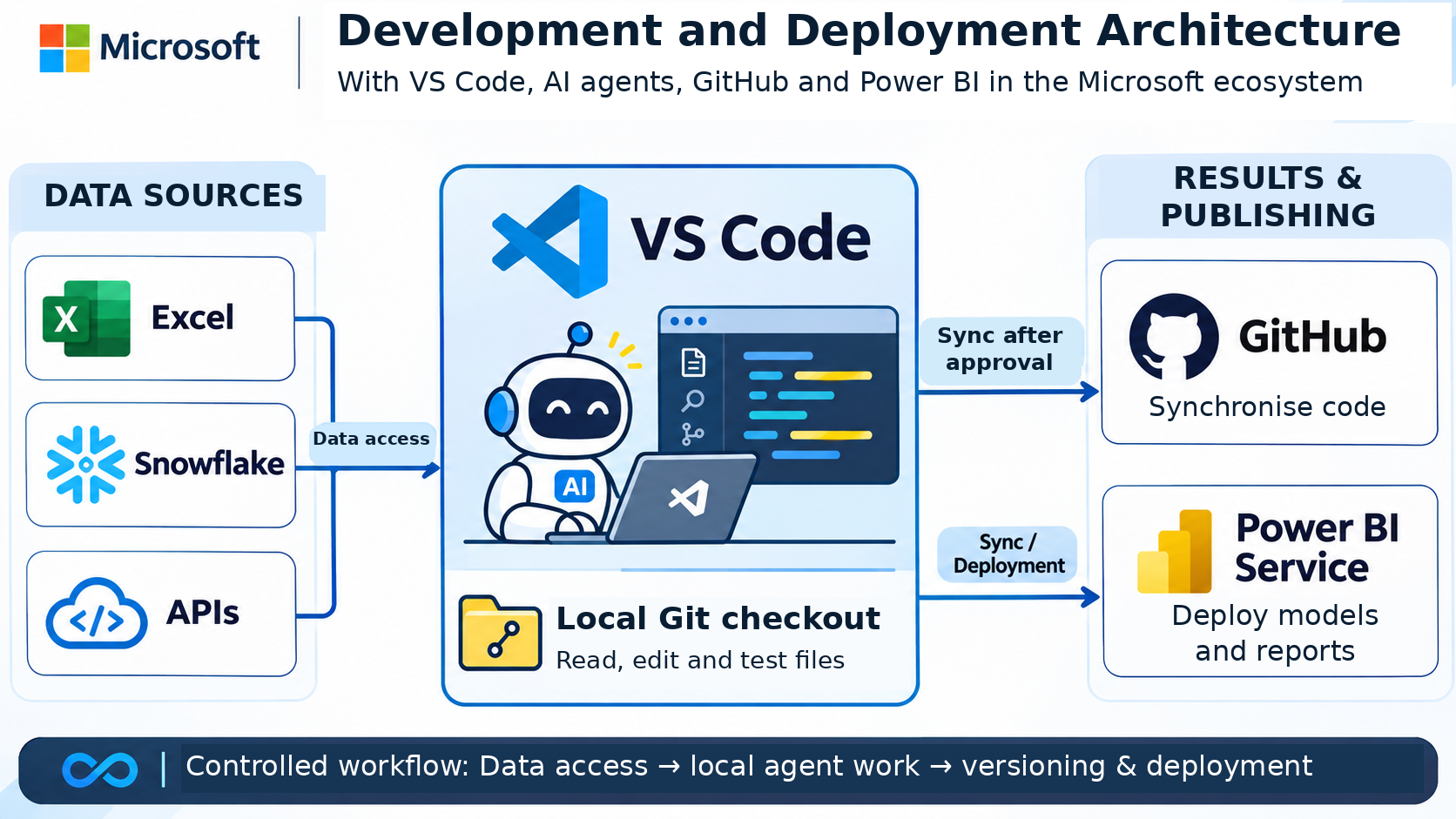
In this example, project files are read, edited and tested in a local Git checkout. Changes are synchronized to GitHub after approval, while deployment to Power BI Service remains a separate, explicitly authorized step. A local checkout does not mean all AI processing happens locally.

Governance belongs in the design
An agent-assisted development setup is still software operating with configured access. Permissions, secrets, data classification and model-provider policies matter.
Review what may enter prompts or tool responses, which providers process it, and which operations can write or deploy. A local workstation or local orchestration component does not by itself mean all processing stays local. Likewise, adding an MCP connection is not a substitute for an appropriate access and security review.
Power BI, Fabric and GitHub Copilot availability and licensing depend on the chosen features and environment. This consultancy offering should not be confused with a bundled Microsoft software licence or a guarantee that every tenant supports the same workflow.
Where consultancy can help you start
The first useful discussion is about your development process: where work is repetitive, where review is difficult, which definitions are sensitive, and what evidence would demonstrate a useful result.
From there, assess a bounded candidate use case and the tools, access and acceptance conditions it would need. That is a more practical basis for adopting agentic development than treating the technology as an automatic replacement for a Power BI developer.
Power BI agentic development consultancy is available now from DataDriven.pro. Contact us to discuss your development workflow and a suitable starting point.
Please keep credentials, access tokens and confidential data out of your initial enquiry.
Sources and further reading
- Microsoft: Power BI Agentic overview
- Microsoft: Power BI authoring and consumption MCP options
- GitHub: About GitHub Copilot
Views: 2